

Most wine inventory projects don't fail at vendor selection. They fail somewhere around day 40, when the data migration turns out messier than anyone admitted, the tasting room POS won't map SKUs cleanly, and the cellar team quietly keeps their old spreadsheet running "just in case." Six months later you've paid for software nobody fully trusts.
This playbook is built to prevent exactly that. It assumes you've already picked a vendor — or you're close — and now need a disciplined 90-day runway to actually go live. The scope is tight on purpose: data migration, SKU/barcode mapping, integration sequencing, testing, training, KPIs, and rollback. If you're still comparing products, that's a different exercise. This is about wine inventory management software implementation — the part where good decisions turn into working operations.
The 90-day shape: three phases, not three sprints
Wineries that rush implementation almost always compress the wrong phase. They'll spend six weeks debating field names, then try to migrate three vintages of inventory and train 14 tasting-room staff in the final week before a club release. That's backwards.
| Phase | Days | Primary goal | Who's involved |
|---|---|---|---|
| Foundation | 0–30 | Requirements locked, data cleaned, mapping rules set | Ops lead, cellar master, IT/vendor |
| Build & integrate | 31–60 | Migration complete, integrations tested, KPIs defined | Vendor, POS/ERP admins, finance |
| Validate & launch | 61–90 | Staff trained, parallel run, go-live, rollback ready | Everyone touching inventory |
Worth noticing: the last 30 days should feel calm if the first 30 were done properly. When the final phase feels frantic, it's almost always because the foundation phase got skipped to "save time."
Days 0–30: Foundation (where most of the real work hides)
Lock the requirements before you touch any data
Streamline your winery operations effortlessly.
Corkyly helps you track, manage, and optimize every step from vine to bottle.
- Vineyard & production tracking
- Customer relationship management
- Inventory & sales analytics
No credit card required
The requirements checklist isn't a formality — it tells you whether your migration will take two days or two weeks. Run through this with your cellar master and tasting-room lead in the same room, not over email:
-
Inventory states you actually use — bulk wine, barrel lots, bottled-not-labeled, finished goods, library/reserve, samples, breakage/dump
-
Units of measure — gallons, liters, cases, bottles, and the conversion rules between them (this trips up more projects than anything else)
-
Location granularity — is a "location" a building, a room, a tank, a barrel row, a pallet position?
-
Lot/batch identity rules — how a lot gets named and whether bottling creates a new identity
-
Channel definitions — DTC, wine club, tasting room, wholesale, distributor, export
-
Tax and compliance fields — TTB classes, bond status, state registration flags
-
User roles and permissions — who can adjust inventory, who can only view, who approves write-offs
One thing that consistently gets missed: dump and loss accounting. Wineries track what they made and what they sold, but the loss between the two — topping, racking, sampling, breakage — often lives nowhere formal. If your new system doesn't have a clean home for it, your counts will drift within a month.
Clean the data where it lives now, not after migration
You cannot clean data inside a new system. Fix it in the source. The most common mess in wine inventory is inconsistent SKU naming across channels — the same wine showing up as "2022 CS Reserve," "22-CabSauv-RSV," and "Reserve Cabernet 2022" depending on whether it's in the POS, the accounting file, or the cellar spreadsheet.
Before you export anything, standardize on one canonical name and one canonical SKU per sellable unit.
The data-migration CSV template
sku,productname,vintage,varietal,appellation, unitofmeasure,bottlesizeml,casepack, inventorystate,locationcode,lotcode, quantityonhand,costperunit,ttbclass, bondstatus,channelallocation,reorder_point,notes
A few rules that save pain later:
-
One row = one SKU in one state in one location. If 2022 Cab Reserve sits in both the bonded warehouse and the tasting room, that's two rows.
-
No blank quantity cells. Use
0, never empty — blanks import unpredictably. -
Dates in ISO format (
2022-09-14), never9/14/22. Mixed date formats are the single most common migration failure. -
Keep a
legacy_idcolumn mapping back to your old system so you can audit after import.
SKU and barcode mapping rules
Barcode mapping is where tasting-room and distributor operations collide. A few mapping rules that prevent the common disasters:
-
Each sellable unit gets a GTIN/UPC at the bottle level, and a separate code at the case level. Scanning a case and a bottle should never resolve to the same inventory movement.
-
Vintage must be encoded in the SKU, not just the barcode label. When a new vintage releases and reuses old packaging, un-vintaged SKUs silently merge two years of wine.
-
Reserve and library wines need distinct SKUs even if the label is identical to the standard release — because their allocation rules and pricing differ.
-
Samples and "do not sell" stock get a flag, not a deletion. You still need to count them; you just can't let them hit a register.
Barcode mapping is where tasting-room and distributor operations collide. A few mapping rules that prevent the common disasters:
Days 31–60: Build and integrate
Integration sequencing (POS → ERP → analytics)
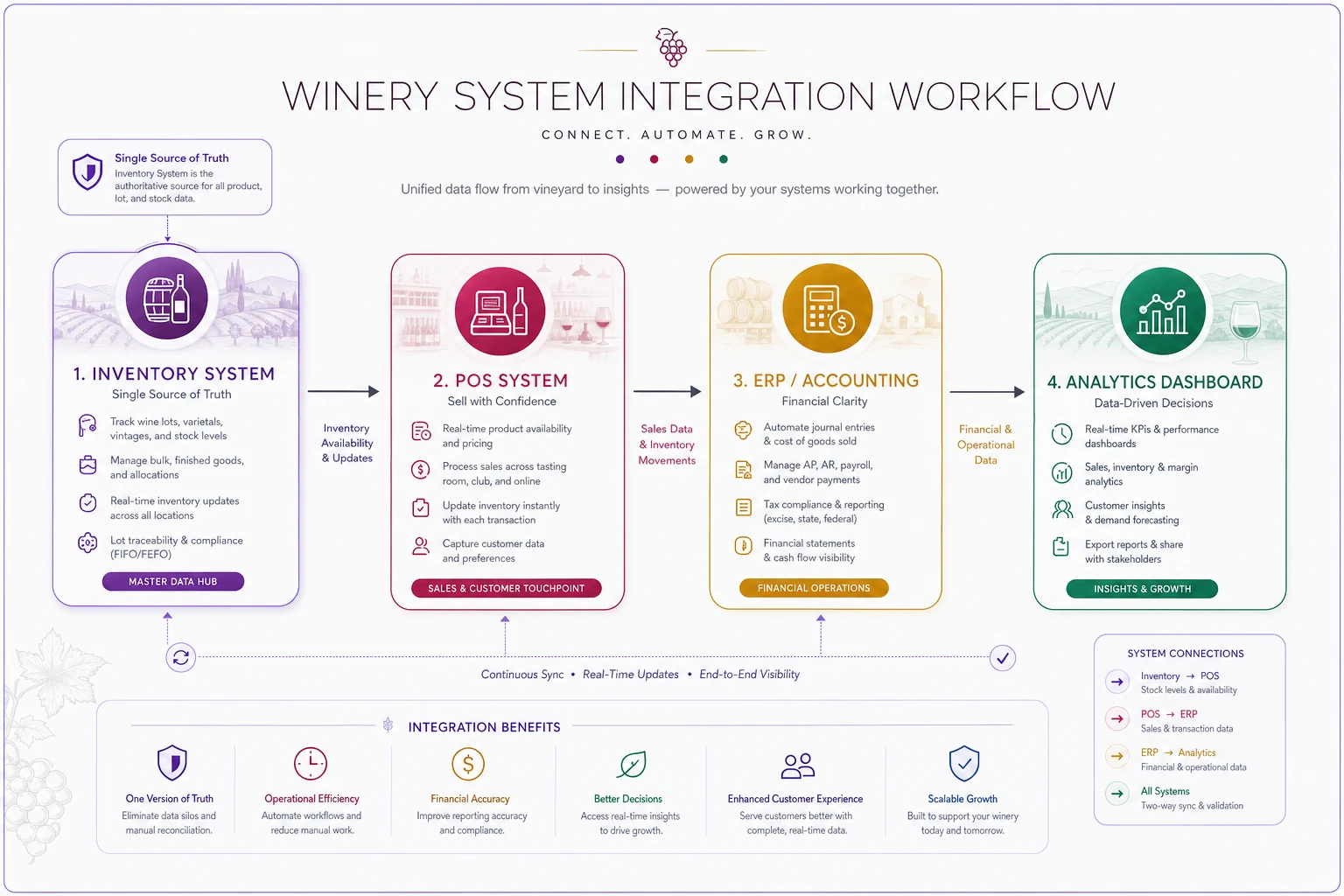
Integrate in dependency order, not convenience order. The sequence almost always runs: inventory system first as the source of truth, then POS, then ERP/accounting, then analytics last.
[Inventory System] ↓ [POS System] ↓ [ERP/Accounting] ↓ [Analytics Dashboard]
Here's a simple workflow showing the recommended integration sequence.
POS/ERP/analytics integration checklist:
-
[ ] Inventory system confirmed as single source of truth for quantities
-
[ ] POS sales decrement inventory in near-real-time (confirm the sync interval — hourly batch vs instant matters for club-release days)
-
[ ] Returns and voids in POS reverse inventory correctly (test a void, not just a sale)
-
[ ] ERP pulls cost and quantity for COGS — confirm which system "wins" if they disagree
-
[ ] Distributor orders map to the correct channel and allocation pool
-
[ ] Tax/compliance fields flow to reporting without manual re-entry
-
[ ] Analytics dashboard reads from the inventory system, not a stale nightly copy
-
[ ] Every integration has an error log someone actually checks
Deliberately test refunds, split cases, and write-offs — the ugly paths reveal configuration bugs.
The mistake pattern here: wineries test the happy path (a normal sale decrements stock) and skip the ugly paths — a refunded club shipment, a split case, a damaged-in-transit write-off. The ugly paths are where inventory drift is born. Test those deliberately.
If your distributor relationships involve contract windows and allocation commitments, make sure the mapping respects them. This is where a clean setup pays off against the rules you've likely already defined in your distributor governance playbook. Misaligned channel codes at integration time quietly break the SLAs you worked hard to set.
Testing scripts
Write test scripts as literal step-by-step actions with an expected result. Vague testing ("make sure sales work") finds nothing. Specific scripts find problems before customers do.
Test: Tasting-room case sale with vintage switch
-
Sell 1 case of 2022 Cab Reserve via POS
-
Confirm inventory for that SKU/location drops by 1 case (12 bottles)
-
Confirm the 2021 vintage SKU is untouched
-
Confirm the sale appears in the analytics dashboard within the expected sync window
-
Void the sale; confirm all three checks reverse exactly
Run comparable scripts for: distributor bulk order, club allocation release, bottle-level DTC sale, breakage write-off, and inter-location transfer. If any script needs manual correction to pass, that's a configuration bug — log it, don't work around it.
KPI dashboard spec
Decide your KPIs before go-live, because retrofitting them later means recounting. A workable starter spec for a small winery:
-
Inventory accuracy % — system count vs physical count, by location
-
Days of inventory on hand — by SKU and by channel
-
Shrink/loss rate — dump, breakage, sampling as a % of production
-
Allocation fill rate — committed vs shipped, by channel
-
Reorder trigger adherence — how often stock hit reorder point without a PO
Keep the first dashboard small. Five metrics people check weekly beat twenty that nobody opens. The procurement-side metrics tie directly into reorder discipline, which pairs well with a seasonal procurement calendar so your reorder points reflect real lead times instead of guesses.
Days 61–90: Validate, train, and launch
Staff training schedule
Train by role, not all-at-once, and train on the real system with real data — never slides.
| Week | Group | Focus | Format |
|---|---|---|---|
| 9 | Cellar team | Lot moves, transfers, write-offs | Hands-on, in the cellar |
| 9 | Tasting room | POS sales, returns, club lookups | Live register, mock transactions |
| 10 | Finance/admin | COGS, reconciliation, reports | Walkthrough + first real close |
| 10 | Managers | Dashboards, exceptions, approvals | Dashboard review session |
| 11 | Everyone | Error handling, who to call | Short refresher |
The group most often under-trained is the tasting room, which is ironic because they generate the most inventory transactions per day. Spend extra time there on the awkward cases: a customer returning a corked bottle, a split case sale, a club pickup that was already decremented.
Run parallel before you cut over
For at least two weeks — ideally covering one full reconciliation cycle — run the new system alongside your old process. Compare counts daily for the first few days, then weekly. If the two systems diverge by more than a case or two on any fast-moving SKU, stop and find out why before go-live, not after.
Rollback and contingency plans
Every go-live needs a defined "undo." Write it down before launch day, not during the panic:
-
Rollback trigger define the condition that forces reversion (e.g., inventory accuracy below 95% after 72 hours, or POS unable to process sales for more than an hour).
-
Decision owner one named person makes the rollback call — not a committee at 7pm on a release Saturday.
-
Data snapshot take a full export immediately before cutover so you can restore the pre-launch state.
-
Fallback process the old spreadsheet/manual method stays usable for 30 days post-launch. Don't delete it on day one.
-
Communication script who tells the tasting room, distributors, and club members if sales are paused.
The teams that recover fastest from a bad go-live are the ones who rehearsed the rollback. The ones who improvise it tend to lose a day of sales and a lot of staff confidence.
A short real scenario
A roughly 9,000-case estate winery on the Central Coast ran three disconnected systems: a tasting-room POS, a cellar spreadsheet, and QuickBooks. Their recurring problem was reconciliation — at each month's end, bottle counts between the POS and the cellar sheet were off by anywhere from 40 to 120 bottles, and nobody could reliably explain the gap. Most of it turned out to be untracked samples and a vintage-merge SKU error.
They ran a 90-day implementation close to the structure above. The foundation phase alone — cleaning SKUs and separating sample and library stock into their own flagged codes — eliminated most of the mystery variance before migration even started. After go-live and one parallel reconciliation cycle, the month-end discrepancy dropped to under 15 bottles, and the monthly close that used to eat the better part of two days shrank to a single afternoon.
Nothing exotic happened. They just stopped guessing which number was real.
When this 90-day timeline makes sense — and when it doesn't
It makes sense when: you have one to three channels, under roughly 25,000 cases, and a cleanable (if messy) existing dataset. Ninety days is comfortable.
It's too aggressive when: you're migrating multiple bonded locations, several vintages of bulk and barrel inventory, and you have no clean canonical SKU list. Give yourself 120–150 days instead. Trying to force it into 90 is how the parallel-run phase gets cut — which is the one phase you never want to skip.
Skip the big-bang go-live entirely if: your busiest release or harvest intake falls inside your launch window. Never cut over during peak. Push launch two weeks past the crunch; the inventory count will be cleaner and the staff will actually have bandwidth to learn the system.
Where packaging and inventory setup quietly overlap
One setup detail worth flagging: how you encode packaging into SKUs.
If you're mid-transition on packaging — new closures, lighter glass, different case configs — your SKU and barcode rules need to account for the changeover, or you'll end up with two physical products sharing one code. If packaging changes are on your roadmap, align the implementation with your sustainable packaging transition framework so new pack formats get clean SKUs from day one rather than being retrofitted later.
Final thought
A good wine inventory implementation isn't measured by how impressive the software looks on launch day. It's measured three months later, when month-end close is quiet, the tasting room scans without workarounds, and nobody's keeping a secret spreadsheet.
That outcome is almost entirely decided in the first 30 days — in the unglamorous work of cleaning SKUs, defining states, and writing down what "one row" means. Get the foundation right and the back half of this timeline mostly takes care of itself. Rush it, and you'll be reconciling ghosts for a year.
That outcome is almost entirely decided in the first 30 days — in the unglamorous work of cleaning SKUs, defining states, and writing down what "one row" means. Get the foundation right and the back half of this timeline mostly takes care of itself. Rush it, and you'll be reconciling ghosts for a year.
Ready to elevate your winery management?
Join 500+ wineries using Corkyly to increase operational efficiency, boost customer loyalty, and grow sales.