

Most vineyard management software projects don't fail at the demo. They fail about four months in, when the spray tech is still writing applications on a clipboard, lab results live in someone's inbox, and the "centralized" system holds maybe 60% of what's actually happening in the blocks. The software works fine. The deployment didn't.
A clean vineyard management software implementation isn't about picking the flashiest platform. It's about mapping your real data sources before you talk to a single vendor, defining what "done" looks like, and running a pilot small enough to catch problems before they become habits. This checklist walks through that sequence — with the timelines and structure you'll actually need.
We're going to skip the "why you need software" pitch and assume you're already sold on the concept. The hard part is execution.
Start with a data inventory, not a feature wishlist
The single biggest mistake in these projects is reversing the order: operators fall in love with a feature set, buy it, and then discover their data doesn't feed it cleanly. Your data sources dictate what's realistic. Catalog them first.
Walk your operation and write down every place a number or note gets recorded today. Not where it should live — where it actually lives right now. In most small-to-mid wineries, that list ends up looking something like:
-
Sensor data — soil moisture probes, weather stations, irrigation controllers. Note the export format (CSV, API, proprietary dashboard, or nothing at all).
-
Spray records — usually the messiest category. Paper logs, a shared spreadsheet, texts to the vineyard manager, maybe a compliance app that nobody loves.
-
Harvest estimates — pre-harvest yield sampling sheets, cluster counts, lag-phase weights. Often in a notebook or one person's head.
-
Lab results — Brix, pH, TA, and later panel numbers. Frequently emailed as PDFs from an outside lab.
-
Phenology and scouting notes — bud break dates, veraison, pest trap counts, disease pressure observations.
-
Labor and task records — who did what, in which block, on which day.
For each source, record four things: the format, how often it updates, who owns it, and how clean it is today. That last column is the one people skip. A soil probe that logs every 15 minutes but drops offline half the summer is not a reliable data source, and no software fixes that problem for you.
The sources that cause the most trouble post-launch are almost always the hand-entered ones — spray and scouting. Automated sensor feeds migrate fine. Human-captured records break because the capture habit never actually changed. Keep that in mind; it shapes everything in the pilot phase.
Define integration and reporting requirements before the RFP
Once you know what you have, decide what the system actually needs to do with it. Write this as plain-language requirements, separated into must-haves and nice-to-haves. Vendors will try to blur that line — your job is to hold it.
Streamline your winery operations effortlessly.
Corkyly helps you track, manage, and optimize every step from vine to bottle.
- Vineyard & production tracking
- Customer relationship management
- Inventory & sales analytics
No credit card required
Think through integration in three buckets:
-
Inbound — what has to flow into the system automatically? Weather station feeds, lab result imports, maybe your accounting system for labor costs.
-
Internal — what connections matter inside the platform? Can a spray record tie to a specific block and a specific product with a REI that then blocks scheduling a crew into that block too early?
-
Outbound — what reports do you need to produce, and for whom? This is where compliance lives.
On reporting, don't just list "spray reports." Name the exact outputs. A typical requirement list reads:
-
Annual pesticide use report in your state's required format
-
Block-level spray history export filterable by date and product
-
Pre-harvest yield summary by block and variety with confidence range
-
Lab trend reports (Brix/pH/TA over time per block)
-
A simple task-completion view so the manager can see what's done without walking every row
Write down who consumes each report and in what format they need it. A regulator wants a specific PDF layout. Your winemaker wants a quick dashboard. A distributor compliance request is different again — if you've dealt with the documentation demands in a distributor governance playbook with SLAs and escalations, you already know those requests arrive on short notice and in nonnegotiable formats. Build the requirement around the consumer, not the feature name.
Build the RFP and a scorecard that resists the demo effect
The demo is designed to impress. The scorecard exists to keep you honest afterward, when three platforms all "did everything" and you can't remember what actually set them apart.
Your RFP should be short and specific. Skip the boilerplate and send vendors:
-
Your prioritized requirements (must-haves vs. nice-to-haves)
-
Your data inventory summary, so they can speak to real integrations
-
Three to five scenario questions pulled directly from your operation
-
Questions on data ownership, export rights, pricing at your acreage, and what happens to your data if you leave
Those scenario questions matter more than any feature checklist. Instead of "Do you support spray records?" ask: "A tech applies a product with a 48-hour REI to Block 7 at 6am Tuesday. Walk me through exactly how that gets recorded, and show me how the system prevents a crew being scheduled into Block 7 before Thursday 6am." Watch whether they demo it live or tell you it's "on the roadmap."
| Criteria | Weight | Vendor A | Vendor B | Vendor C |
|---|---|---|---|---|
| Must-have features covered | 25% | |||
| Field/mobile usability (offline capture) | 20% | |||
| Integration with your data sources | 15% | |||
| Compliance reporting fit | 15% | |||
| Data ownership & export terms | 10% | |||
| Total cost at your acreage (3-yr) | 10% | |||
| Support & onboarding quality | 5% |
Weight the rows to match your actual pain. If spray compliance is the fire you're putting out, reporting fit and offline capture should dominate — not the prettiest map view.
One criterion that often gets underweighted: offline mobile capture. Cell coverage in vineyards is unreliable, and a platform that needs a signal to log a spray at the far end of the ranch will quietly fail adoption. Techs won't fight bad tools; they'll go back to the clipboard.
Run a narrow field pilot — not a full rollout
The instinct is to launch everywhere at once so you "get value sooner." A pilot covering your whole operation can't tell you what's wrong, because everything is new and everyone's confused. A narrow pilot isolates the real friction.
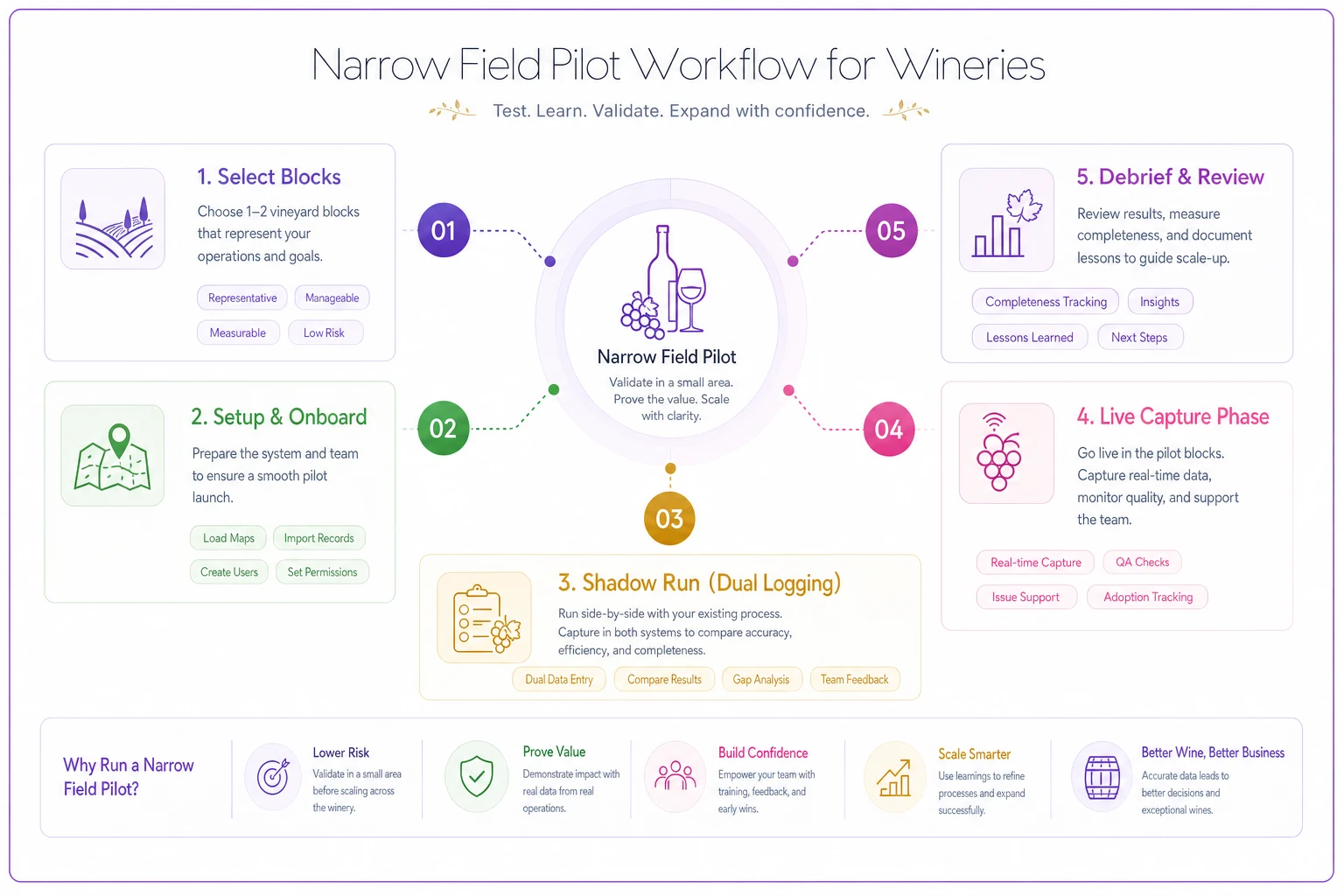
Pick one or two blocks and one complete workflow — spray recordkeeping is the ideal candidate because it's high-compliance and high-friction. Run it for a full cycle: a few application rounds, start to finish.
-
Weeks 1–2
Setup.
Load block maps, product list, user accounts. Import one season of historical spray records so the system isn't starting from empty. -
Weeks 3–4
Shadow run.
Techs record in the new system and keep the old method. Compare. You're hunting for gaps, not judging anyone. -
Weeks 5–8
Live capture.
Drop the old method for the pilot blocks. Watch where people hesitate or quietly revert. -
Week 9
Debrief.
What got skipped? What took too long? What reports came out wrong?
A simple workflow for a narrow field pilot:
During the pilot, track completeness, not just usage. The number that tells the truth: percentage of applications recorded in the system within 24 hours, with all required fields filled. If that sits below roughly 90% by week 8, you have a problem to solve before expanding — could be a tool issue, a training gap, or a workflow that fights how the crew actually moves.
The best pilots connect to a capture discipline you've already thought through. If you've built low-friction spray capture forms and auditor exports conceptually, the software pilot is just enforcing that same discipline digitally. The form logic should mirror what works on paper, only faster.
Train users for field reality, not the training room
Training fails when it's a two-hour classroom session on a laptop, followed by expecting a spray tech to use a phone app at dawn in the rain. The gap between those two environments is where adoption dies.
Train in the environment where the work actually happens. A few rules that hold up:
-
Role-based, not platform-wide. The tech needs three screens, not thirty. Teach only what each role touches.
-
Hands-on in the block. Have the tech log a real application on their own device, in the field, with you standing there.
-
A one-page cheat sheet per role. Physical, laminated, in the truck. The help portal won't get opened at 6am.
-
Name an internal champion — usually the vineyard manager or a sharp crew lead — who fields quick questions so people don't give up and revert.
Train everyone once and assume it stuck — that's exactly where things fall apart. Plan a short refresher after the first two weeks of live use, when real questions have surfaced and people actually have a reason to care about the answers.
Measure ROI and compliance readiness with numbers you'll trust
ROI on vineyard software is partly hard dollars, partly risk reduction. Measure both, but don't pretend the risk side is precise.
Hard-dollar items you can actually track:
-
Time saved on recordkeeping and report generation (hours/week × loaded labor rate)
-
Reduced data re-entry between systems
-
Fewer wasted inputs from better spray and irrigation records
Risk and compliance readiness — measure as capability, not savings:
-
Can you produce a complete annual spray report in minutes instead of a day of digging?
-
Are REI and PHI violations now system-prevented rather than caught after the fact?
-
Is your block-level history audit-ready without a scramble?
Sample KPIs worth tracking from day one:
-
% of spray applications logged within 24 hours (target
95%+)
-
Time to generate the annual compliance report (target
under 30 minutes)
-
% of blocks with complete pre-harvest yield sampling in the system
-
Number of scheduling conflicts caught by the system (REI overlaps prevented)
A realistic scenario
A roughly 90-acre estate in a cool-climate region ran spray records on a shared spreadsheet plus paper field notes. Compiling the annual pesticide use report took the vineyard manager around two full days of cross-referencing every year, and a handful of applications always had missing or mismatched REI data that had to be reconstructed from memory.
They ran a two-block pilot through one spray season, then expanded. By the following harvest, applications were logging in-system the same day at roughly 90–95%, and the annual report dropped from two days to under an hour. The quieter win: two near-miss scheduling conflicts — crews nearly sent into a block still inside its REI window — got flagged automatically before anyone entered the rows. Hard to put a dollar figure on that, but it's exactly the kind of mistake that becomes a worker-safety incident and a compliance violation at the same time.
Those numbers aren't dramatic. That's the point. Real deployments produce steady, unglamorous improvements — not overnight transformation.
When this is worth it, and when it isn't
When a full implementation makes sense:
-
You're managing enough acreage or blocks that spreadsheets have started dropping records
-
Compliance reporting eats real staff time or has caused close calls
-
You run multiple data sources — sensors, lab, spray, scouting — that nobody can see together
-
You're planning to scale and don't want the current chaos to scale with you
When it's premature:
-
You haven't cleaned up your underlying capture habits. Software enforces process; it doesn't invent one. If your spray data is unreliable on paper, it'll be unreliable in an app.
-
You're buying it to avoid a decision you haven't made — like who actually owns data entry.
-
You're a very small operation where one good spreadsheet and disciplined habits genuinely cover you. Not every vineyard needs a platform.
Who should wait: operators mid-way through a messy season, or those about to change vineyard managers. Deploy during a quieter window, with the person who'll own it long-term in the room from day one.
The condensed implementation checklist
Print this. Work it in order.
-
[ ] Inventory every data source — format, frequency, owner, current cleanliness
-
[ ] Separate requirements into must-haves vs. nice-to-haves
-
[ ] Map integrations
inbound, internal, outbound
-
[ ] Name each report's consumer and required format
-
[ ] Write 3–5 scenario questions from your real operation
-
[ ] Build a weighted vendor scorecard; weight it to your actual pain
-
[ ] Confirm data ownership and export rights in writing
-
[ ] Run a narrow field pilot on one workflow (spray is ideal)
-
[ ] Track 24-hour capture completeness, not just logins
-
[ ] Train by role, in the field, with a one-page cheat sheet
-
[ ] Schedule a two-week refresher after go-live
-
[ ] Measure both hard-dollar savings and compliance readiness
-
[ ] Expand only after pilot completeness holds above roughly 90%
The same discipline that keeps a deployment on track — mapping sources, defining outputs, piloting narrow — travels well across other operational problems, whether you're building a seasonal procurement calendar with dynamic reorder rules or working through a sustainable packaging decision framework and supplier transition. Good data habits don't stay in one department.
Final thought
A vineyard management platform is only as good as the records going into it, and records only improve when the capture workflow gets easier than the old way — not harder.
That's why the order in this checklist matters more than the software you pick. Map your sources, define your outputs, pilot narrow, train in the field, and measure the things that actually tell you whether people are using it. Do that, and the platform becomes something your crew reaches for instead of works around. Skip it, and you'll own an expensive system that holds most of the truth about your vineyard — but not all of it. In compliance terms, that's the same as none of it.
A vineyard management platform is only as good as the records going into it, and records only improve when the capture workflow gets easier than the old way — not harder.
That's why the order in this checklist matters more than the software you pick. Map your sources, define your outputs, pilot narrow, train in the field, and measure the things that actually tell you whether people are using it. Do that, and the platform becomes something your crew reaches for instead of works around. Skip it, and you'll own an expensive system that holds most of the truth about your vineyard — but not all of it. In compliance terms, that's the same as none of it.
Ready to elevate your winery management?
Join 500+ wineries using Corkyly to increase operational efficiency, boost customer loyalty, and grow sales.