
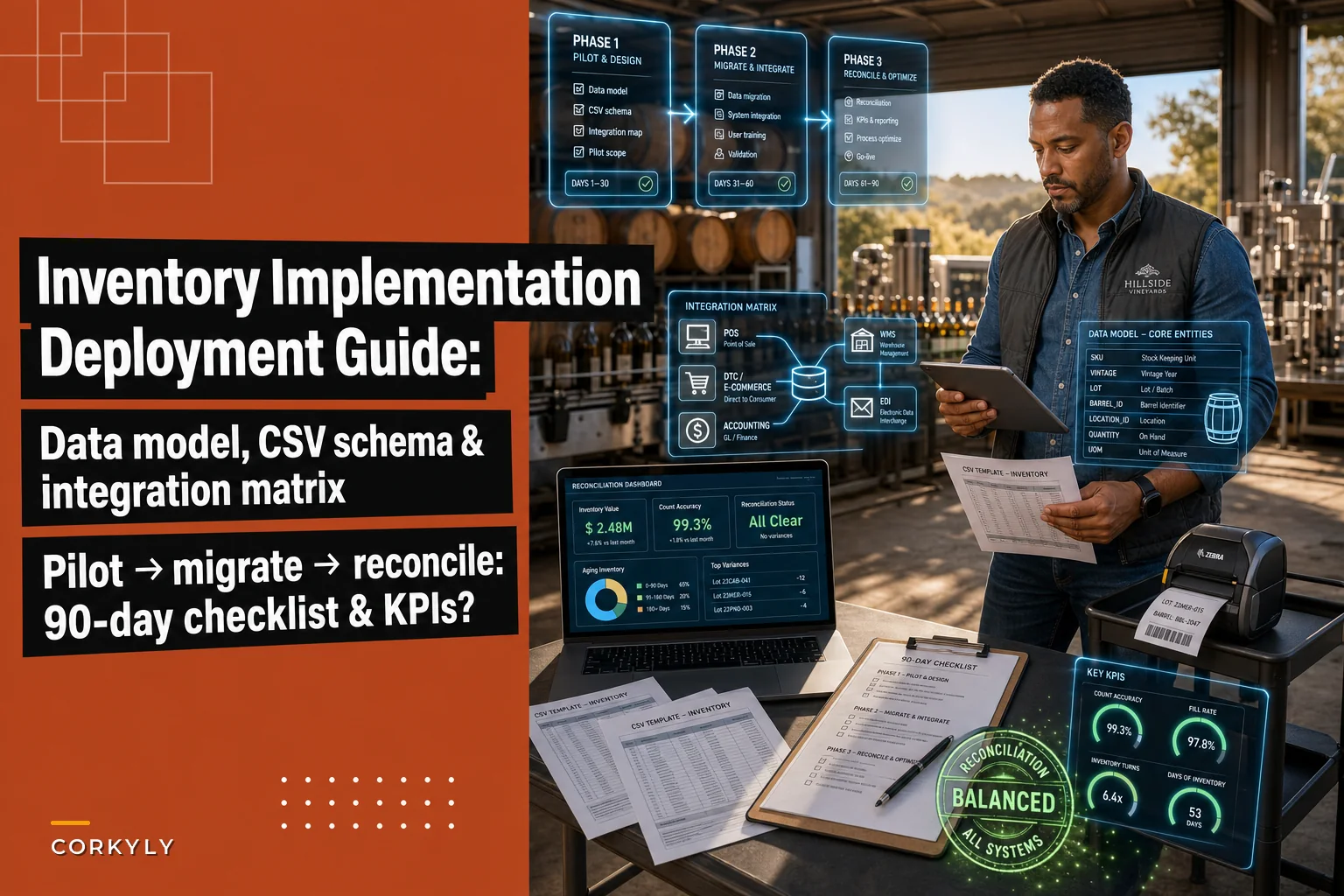

Most failed inventory rollouts don't die at the demo. They die three weeks after go-live, when someone pulls a report showing 412 cases of the '22 Cab in bond, the warehouse has 388 on the floor, and accounting shows a third number that matches neither. Nobody knows which is right, so everyone quietly goes back to the spreadsheet they trusted before.
That gap between "we bought the software" and "the software is now the source of truth" is where almost all the pain lives. This brief is about closing it. Not the sales-cycle stuff — you can read the feature checklist and RFP material elsewhere when you're in procurement mode. This is the part after the contract is signed, when you're staring at a blank import screen wondering what a "lot" even means in this system versus the one your winemaker uses.
What follows is the data model to map, an integration matrix you can hand straight to an integrator, migration templates, reconciliation rituals, and a phased 90-day plan. The whole thing is built to be copied into an RFP appendix or dropped on a consultant's desk.
Start with the data model, because everything downstream breaks if you get this wrong
The single biggest reason a wine inventory software implementation stalls is that the winery never agreed — internally — on what their inventory units actually are before migration day. The POS thinks in bottles. The warehouse thinks in cases and pallets. The winemaker thinks in lots and gallons. Accounting thinks in dollars tied to SKUs. Import without reconciling those four mental models and the system just inherits all of them, which makes it useless.
-
Product/Varietal — the marketing-level identity ("Estate Cabernet Sauvignon")
-
Vintage — the year, which almost everyone forgets is a filtering field, not part of the SKU name
-
SKU — a specific sellable configuration
vintage + varietal + bottle size + packaging. The '22 Estate Cab in 750ml is a different SKU than the same wine in 1.5L
-
Lot — the production/blend identifier that ties back to the cellar. This is your traceability spine
-
Barrel (optional, pre-bottling) — individual vessel tracking for reserve programs
-
Case — the physical shipping/storage unit, with a case-pack ratio (6-pack vs 12-pack matters)
-
Bottle — the atomic sellable unit
The mistake that shows up constantly: wineries treat SKU and lot as the same thing. They're not. One lot can be bottled into three SKUs (750ml, magnum, half-bottle). One SKU can, across years, pull from multiple lots if there's been a blending or re-bottling event. Collapse them and you lose recall precision — which matters enormously if you've invested in block-to-bottle traceability upstream and don't want it dead-ending at the warehouse door.
Fields each entity actually needs
Here's the field map worth putting in your vendor RFP to test whether the system can actually hold your reality:
| Entity | Must-have fields | Easy-to-forget fields |
|---|---|---|
| SKU | SKU code, varietal, vintage, bottle size, case-pack, UPC/GTIN, bond status | Alt-pack variants, alcohol %, TTB class, label version |
| Lot | Lot ID, blend composition, production date, gallons, appellation | Parent/child lot links (for re-blends), TTB lot tie |
| Barrel | Barrel ID, cooperage, toast, fill date, current volume | Topping history, rotation count, planned bottling lot |
| Case | Case ID / license plate, SKU, case-pack qty, location | Pallet ID, bond vs tax-paid flag, received date |
| Bottle | Serialization (if used), SKU, lot link | Library/reserve flag, damage status |
If a vendor can't store the "easy-to-forget" column, you'll be building workarounds by month two. The bond/tax-paid distinction alone is non-negotiable — mixing bonded and tax-paid inventory in a single uncounted bucket is how wineries end up with TTB reconciliation nightmares.
The inventory state matrix — the thing nobody defines until it's too late
A scenario that plays out in real operations more than it should: a tasting room sells six bottles of a wine that's technically "committed" to a wholesale allocation. The system said "available" because nobody told it those bottles were spoken for. Now you're short on a distributor PO and someone has to make an awkward call.
Streamline your winery operations effortlessly.
Corkyly helps you track, manage, and optimize every step from vine to bottle.
- Vineyard & production tracking
- Customer relationship management
- Inventory & sales analytics
No credit card required
The fix is defining explicit inventory states before go-live and making sure every integration respects them. Put this table in your RFP verbatim:
| State | Meaning | Can be sold? | Typical trigger |
|---|---|---|---|
| Available | Free to sell on any channel | Yes | Default on receipt |
| Reserved | Held for a specific order/cart, not yet shipped | No | Checkout, club batch pending |
| Allocated | Committed to a channel or customer, long-term | No | Wholesale contract, club tier |
| In-transit | Physically moving between locations | No | Transfer/PO in motion |
| Damaged/Hold | Quarantined, QA hold, breakage | No | Breakage, label defect, recall |
| Library/Reserve | Intentionally withheld from sale | No | Vertical/library program |
Every bottle must be in exactly one state at all times, and every state change must have an audit trail. When a winery can't explain why available dropped by 40 cases overnight, it's almost always because a state transition happened with no logged reason.
A practical test for your integrator: ask them to walk through what happens to inventory state when a DTC order is placed, paid, picked, and shipped. If the answer skips "reserved" and jumps straight from available to shipped, your oversell problem is already baked in.
The integration matrix
Your inventory system is only as honest as its slowest, least-trusted integration. The goal isn't to connect everything on day one — it's to decide which systems write to inventory versus only read from it. Multiple systems writing to the same inventory count without a clear hierarchy is the root cause of the "three different numbers" problem.
Here's the matrix to hand your integrator. The key decision is direction:
| System | Direction | What flows | Sync cadence |
|---|---|---|---|
| POS / tasting-room tablets | Write (decrement) | Bottle sales, state → available | Real-time |
| E-commerce / DTC | Write (reserve then decrement) | Cart holds, orders, shipments | Real-time / near-real-time |
| Club platform | Write (allocate) | Batch allocations, member commitments | Per batch run |
| Accounting / ERP | Read (reconcile) | COGS, valuation, bond reporting | Daily or on-close |
| WMS / barcode printers | Write (location + receipt) | Receipts, moves, pick confirms | Real-time |
| Distributor EDI | Read/Write | 850/855/856 (PO, ack, ASN), depletions | Per transaction / daily |
Designate exactly one system as the master of truth for physical count — usually the inventory platform itself, fed by the WMS. Everything else proposes changes; the master confirms them. When tasting-room tablets and e-commerce both decrement independently without a master reconciling, you double-count sales during busy weekends.
One thing people consistently skip: EDI with distributors. The 856 ASN (advance ship notice) should automatically flip cases to "in-transit" and clear them on confirmation. If that handshake is manual, your allocated-vs-shipped numbers drift the moment wholesale volume picks up.
Migration — the CSV templates and the reconciliation that keeps you honest
Migration is where confidence is won or lost. Import garbage and the team never trusts the system. The approach that works is boring and deliberate: small, clean, reconciled imports in a fixed order.
Import these in sequence, never all at once:
-
Locations & bins (warehouse zones, bond areas, tasting room)
-
SKU master (the sellable catalog)
-
Lot master (production records, with SKU links)
-
Opening on-hand by SKU + location + state (the big one)
-
Open orders / allocations (reserved and allocated states)
-
In-transit / open POs (EDI-fed where possible)
Sample opening-balance CSV schema
skucode, lotid, locationcode, state, qtycases, casepack, qtybottles, bondstatus, receiveddate, unit_cost, notes
The non-obvious field is qtybottles alongside qtycases. You need both because partial cases are real — a tasting room almost always has broken cases, and if your template only allows whole cases, staff will round, which quietly corrupts counts from day one.
The reconciliation ritual
Don't go live and hope. Run a parallel period where the old system and the new one both operate, and reconcile daily. Here's the rhythm that catches problems while they're still small:
-
Pull available-by-SKU from the new system vs. physical spot-count on the top 10 moving SKUs
-
Investigate any variance over roughly 2 cases before end of day
-
Confirm every state change log has a reason code
-
Full available + reserved + allocated reconciliation against POS, DTC, and club totals
-
Match in-transit against open EDI ASNs
-
Compare system valuation to accounting COGS; flag drift over 1–2%
The discipline here matters more than the tooling. A winery that reconciles top-movers daily for three weeks will trust its numbers by week four. One that waits for the monthly close spends the entire first quarter firefighting.
User roles and permissions — set these before go-live, not after a mistake
Permissions get treated as an afterthought, then someone in the tasting room accidentally adjusts a bond-level count and you've got a compliance headache. Define roles against actions, not job titles:
-
Floor/POS staff — sell, decrement, flag damage. Cannot adjust counts or change state manually.
-
Cellar/production — create lots, manage barrels, propose bottling events. Cannot sell or allocate.
-
Warehouse — receive, move, confirm picks, manage locations. Can adjust physical count with reason code and approval.
-
Ops/admin — full count adjustments, state overrides, allocation policy. All actions logged.
-
Accounting — read-only on quantities, full access to valuation/cost fields.
The right to manually adjust a count should sit with as few people as possible, and every one of those adjustments should require a reason code. Unlogged manual adjustments are the number-one source of "where did that inventory go" mysteries.
The 90-day rollout
[GRAPH: 90-Day Wine Inventory Software Rollout]
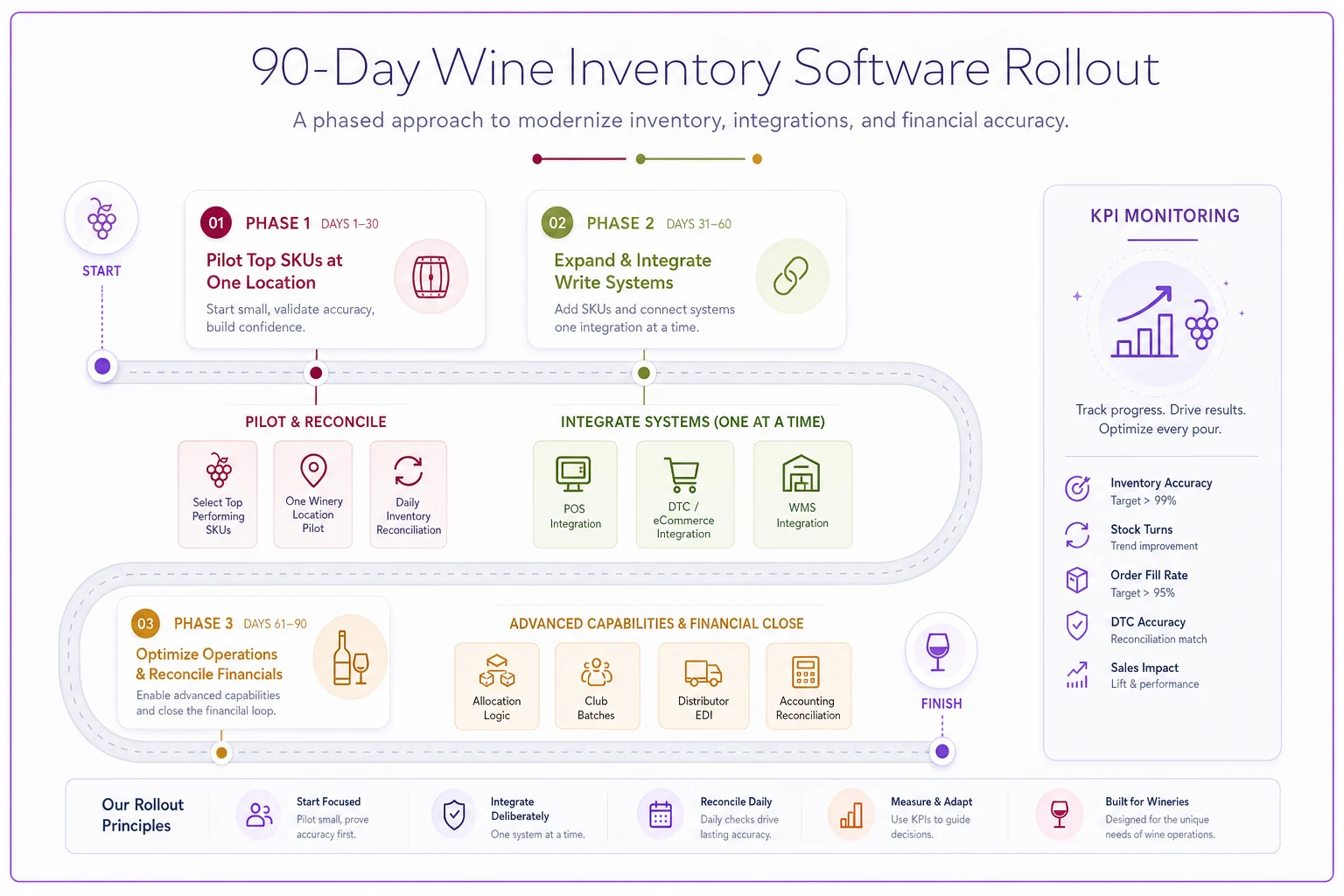
A visual of the phased rollout.
Phase 1 — Days 1–30: Pilot on a contained slice
Pick one location and a limited SKU set — say your top 15–20 SKUs at the main warehouse, no library or reserve complexity yet. Migrate just those, run full daily reconciliation, and don't connect anything you don't have to. The goal of the pilot isn't coverage, it's proving the model holds. If state transitions and reconciliation work for 20 SKUs in one location, they'll scale.
Phase 2 — Days 31–60: Expand SKUs and connect the writers
Bring in the full SKU catalog and turn on the real-time write integrations one at a time — POS first, then DTC, then WMS. Connect each, reconcile for 3–4 days, then move to the next. Resist the urge to flip them all on in a weekend. When one integration causes a variance, you want to know exactly which one.
Phase 3 — Days 61–90: Add the hard stuff and optimize
Now bring in allocation logic, club batches, distributor EDI, and accounting reconciliation. Shift from daily reconciliation on top-movers to weekly full reconciliation. Start tuning reorder points, allocation policies, and damage-rate tracking.
KPIs to track from day one
Don't wait until month three to decide what "working" means. Track these from the pilot:
| KPI | Target |
|---|---|
| Inventory accuracy (system vs. physical, by SKU) | 98%+ by day 90 |
| Oversell incidents | Near zero |
| Reconciliation variance (cases of drift per weekly cycle) | Trending down week over week |
| State-change audit coverage (% with logged reason) | 100% |
| Time-to-reconcile (daily/weekly) | Sharp drop by week four |
These numbers won't all look good on day one, and that's fine. The point is that you're watching them from the start, not discovering problems at the quarterly review.
A real scenario
A roughly 9,000-case estate producer — DTC-heavy, with a wine club and modest wholesale — went into their rollout with inventory living across a POS, a separate e-commerce platform, and two spreadsheets. The recurring problem was club batch months. Every club run, the DTC site kept selling wine the club had quietly committed to, and they'd scramble to cover shortfalls by pulling from library stock or delaying wholesale.
They were eating somewhere around 15–20 cases of overselling per club cycle, plus the staff hours untangling it — close to a full day every batch, across several batches a year.
The fix wasn't complicated. They defined the state matrix above, set club allocations to flip wine into "allocated" the moment the batch was built, and made DTC respect reserved/allocated states in real time. The pilot ran on their top 18 SKUs for a month. By full go-live, overselling on club months had essentially stopped, and the daily reconciliation that used to be a dreaded multi-hour spreadsheet exercise took one person about fifteen minutes.
Nothing about that outcome came from a flashy feature. It came from defining states and directions before migration, then reconciling relentlessly for the first few weeks.
When to phase hard — and when a simpler approach is fine
When the full phased rollout makes sense: multi-channel wineries (DTC + club + wholesale), anyone over roughly 5,000 cases, operations with bond and tax-paid inventory to keep separate, and anyone who's been burned by overselling. The complexity is real and the phasing pays for itself.
When you're overbuilding: a small, single-location, DTC-only producer under a couple thousand cases with no club and no wholesale doesn't need distributor EDI or elaborate allocation states. Map the data model, define four or five states (available, reserved, damaged, library), and go. Don't let a consultant sell you an integration matrix you'll never use.
Who should slow down before starting: if your SKU and lot definitions aren't settled internally, or your team can't agree on what "available" actually means, fix that first. No software resolves a definitional disagreement — it just encodes whichever version got imported. That's also worth reading alongside the broader supplier and procurement planning context, which covers how upstream decisions ripple into inventory systems downstream.
Bringing it together
The difference between a rollout that sticks and one that quietly reverts to spreadsheets comes down to a handful of unglamorous decisions made early: a clean entity hierarchy that separates SKU from lot, an explicit state matrix every integration respects, one designated master of physical truth, and a reconciliation ritual run daily until the team believes the numbers.
Get those right and the 90-day plan mostly runs itself. Get them wrong and no amount of integration polish will save you — you'll just have very fast, very connected, very wrong numbers. Treat the pilot as a proof of the model, not a race to coverage, and you'll walk into full go-live with a team that actually trusts what the screen tells them. That trust, more than any feature, is what the whole implementation is really for.
Ready to elevate your winery management?
Join 500+ wineries using Corkyly to increase operational efficiency, boost customer loyalty, and grow sales.