

Most wineries don't buy inventory software because they're excited about software. They buy it because something broke. A barrel got topped from the wrong lot. A distributor order shipped short and nobody caught it until the chargeback came in. The TTB report took three days instead of three hours because the bulk wine numbers in the cellar never matched the numbers in accounting.
If you're reading this, you've probably already hit that wall. So instead of explaining what inventory software is, this is about how to actually pick one that fits a winery — not a generic warehouse, not a restaurant, not a liquor distributor — and how to roll it out without torching your harvest season.
This guide covers a winery-specific feature checklist, an RFP template you can lift directly, honest cost and ROI math, a migration map for getting out of spreadsheets, and a 90-day phased rollout. Downloadable versions of the checklist and sample RFP are linked at the end.
Start with the three inventory problems unique to wine
Before you look at a single demo, get clear on which of these is actually costing you money. Generic inventory tools handle the first one fine. They fall apart on the second and third.
Transformation tracking. Wine isn't a static SKU. Grapes become must, must becomes a fermenting lot, lots get blended, blended wine gets bottled, bottled wine becomes cased goods. Every step is a transformation where volume and identity change. A system that only understands "you have 400 units of product X" cannot model this. You need lot-level genealogy — the ability to trace a finished case back through blend components, individual tanks, and specific vineyard blocks.
Bulk and packaged inventory living side by side. At any moment you've got gallons in tank, liters in barrel, maybe kegs for on-premise accounts, plus cased goods across multiple locations. These use different units, different valuation methods, and different compliance rules. Software built purely for packaged goods will force your cellar team into workarounds that nobody maintains past the second month.
Compliance that rides on top of operations. TTB reports, state excise filings, and bonded vs. non-bonded inventory aren't an afterthought — they're generated from the same movements your cellar crew records daily. If compliance lives in a separate spreadsheet from operations, you'll always be reconciling two versions of the truth.
A pattern that shows up repeatedly with small and mid-size wineries: the ones who skip this diagnosis buy based on a slick DTC/POS demo, then discover six months in that the system can't handle barrel topping or blend tracking without manual adjustments. Nail down your real problem first.
The winery-specific feature checklist
Use this as a scoring sheet. Rate each vendor 0–3 on every line (0 = can't do it, 3 = does it natively and well). Anything your operation depends on daily should be a hard requirement, not a nice-to-have.
Streamline your winery operations effortlessly.
Corkyly helps you track, manage, and optimize every step from vine to bottle.
- Vineyard & production tracking
- Customer relationship management
- Inventory & sales analytics
No credit card required
Lot, barrel, and bulk tracking
-
[ ] Lot-level genealogy (trace finished goods back to source blocks and blend components)
-
[ ] Barrel-level tracking with cooperage, vintage, toast, and fill history
-
[ ] Barrel topping and additions recorded as traceable movements, not manual edits
-
[ ] Tank management with capacity, current volume, and movement history
-
[ ] Keg tracking with deposit/return status if you sell on-premise
-
[ ] Multiple units of measure (gallons, liters, cases, bottles) with automatic conversion
-
[ ] Blend and bottling work orders that consume bulk and create cased goods
-
[ ] Loss/evaporation ("angel's share") recorded and reportable
Compliance and traceability
-
[ ] TTB report generation (5120.17 operations report) straight from recorded movements
-
[ ] Bonded vs. non-bonded inventory separation
-
[ ] State excise and shipment reporting support
-
[ ] Full forward and backward traceability for recalls (block → bottle and bottle → block)
-
[ ] Audit log of who changed what, when
Sales, POS, and CRM integrations
-
[ ] DTC/tasting-room POS integration with real-time inventory decrement
-
[ ] Wine club / allocation management
-
[ ] Distributor and wholesale order management
-
[ ] Accounting integration (QuickBooks, Xero, or your ERP)
-
[ ] CRM sync so club members and purchase history connect to allocation decisions
Operations and usability
-
[ ] Mobile/tablet entry that works in a cold, wet cellar with gloves on
-
[ ] Offline capability (cellars and warehouses have dead zones)
-
[ ] Barcode/QR scanning for case and pallet movements
-
[ ] Role-based permissions (cellar crew, tasting room, accounting, owner)
-
[ ] Physical inventory / cycle count workflow
-
[ ] Reporting you can actually export and filter
One thing worth flagging on integrations: "integrates with QuickBooks" can mean a real-time two-way sync, or it can mean a nightly CSV export you have to babysit. Ask vendors to show the integration live, not describe it. The gap between those two is where a lot of post-purchase regret lives.
The RFP template you can lift
If you're spending more than roughly $8k–$12k a year, send a real RFP to three or four vendors. It forces them to answer in writing, and written answers are harder to walk back than demo promises. Here's a structure that works for wineries:
1. Company and context (half a page)
-
Annual case production and bulk gallons under management
-
Number of locations (vineyard, winery, bonded warehouse, tasting rooms)
-
Sales channel mix (DTC %, wholesale %, club %)
-
Current systems you're replacing or integrating with
-
Team size and who will use the system daily
2. Functional requirements
Paste the checklist above and ask the vendor to mark each line: Native / Configurable / Via integration / Not supported. Require a note on anything that isn't "Native."
3. Integration requirements
-
List every system that must connect (POS, accounting, email/CRM, shipping/compliance)
-
Ask
real-time or batch? Two-way or one-way? Who maintains the connector?
4. Compliance specifics
-
Which TTB and state reports does it generate out of the box?
-
How does it handle a mid-year rate or form change?
5. Implementation and data migration
-
Who does the data migration — you or them?
-
Typical go-live timeline for a winery your size
-
What training is included, and in what format?
6. Commercial terms
-
Pricing model (per user, per case, flat tier)
-
Implementation/setup fees
-
What triggers a price increase at renewal?
-
Contract length and exit terms (can you export your own data, and in what format?)
7. References
-
Two wineries of similar size and channel mix. Call them. Ask one question specifically: "What broke during your first harvest on the system?"
That last question gets you more truth than the entire rest of the RFP.
Cost and ROI: the honest math
Pricing lands in a few rough tiers depending on production volume and channel complexity. Here's a realistic breakdown rather than vendor list prices:
| Winery profile | Typical annual software cost | Implementation (one-time) | Main cost driver |
|---|---|---|---|
| Small, DTC-heavy (<5k cases) | ~$3k–$8k | $1k–$5k | User seats, POS integration |
| Mid-size, mixed channel (5k–30k cases) | ~$9k–$25k | $5k–$20k | Compliance + distributor features |
| Larger, multi-location (30k+ cases) | ~$25k–$60k+ | $20k–$50k+ | Integrations, custom reporting, migration |
Don't anchor on the subscription number alone. The costs that actually bite:
-
Implementation and migration — often underquoted. Budget more than the vendor's optimistic estimate.
-
Internal time — someone on your team will spend real hours on setup. That's a cost even if it's not an invoice.
-
Integration maintenance — connectors break when a connected system updates. Know who fixes it.
On the ROI side, the returns are usually less glamorous than vendors claim and more durable than you'd expect. Real savings show up in three places:
-
Compliance time. A winery doing monthly TTB and state filings manually from spreadsheets often spends two to four days a month on reconciliation and reporting. Cutting that to under a day is common once movements feed reports automatically.
-
Shrink and errors. Short shipments, mis-picks, and untracked bulk losses quietly drain margin. Even modest improvement in count accuracy on a 15k-case operation adds up across a full year.
-
Faster recalls. This one's insurance, not savings — until the day you need it. A recall you can execute in hours instead of days is the difference between a contained problem and a reputational one.
A realistic payback window for a mid-size winery is somewhere in the 12–24 month range when you count only the time savings. If you factor in the compliance-penalty and recall risk you're reducing, it's faster — but that math is harder to put on a spreadsheet, so be honest with yourself about how much weight to give it.
Mapping your way out of spreadsheets
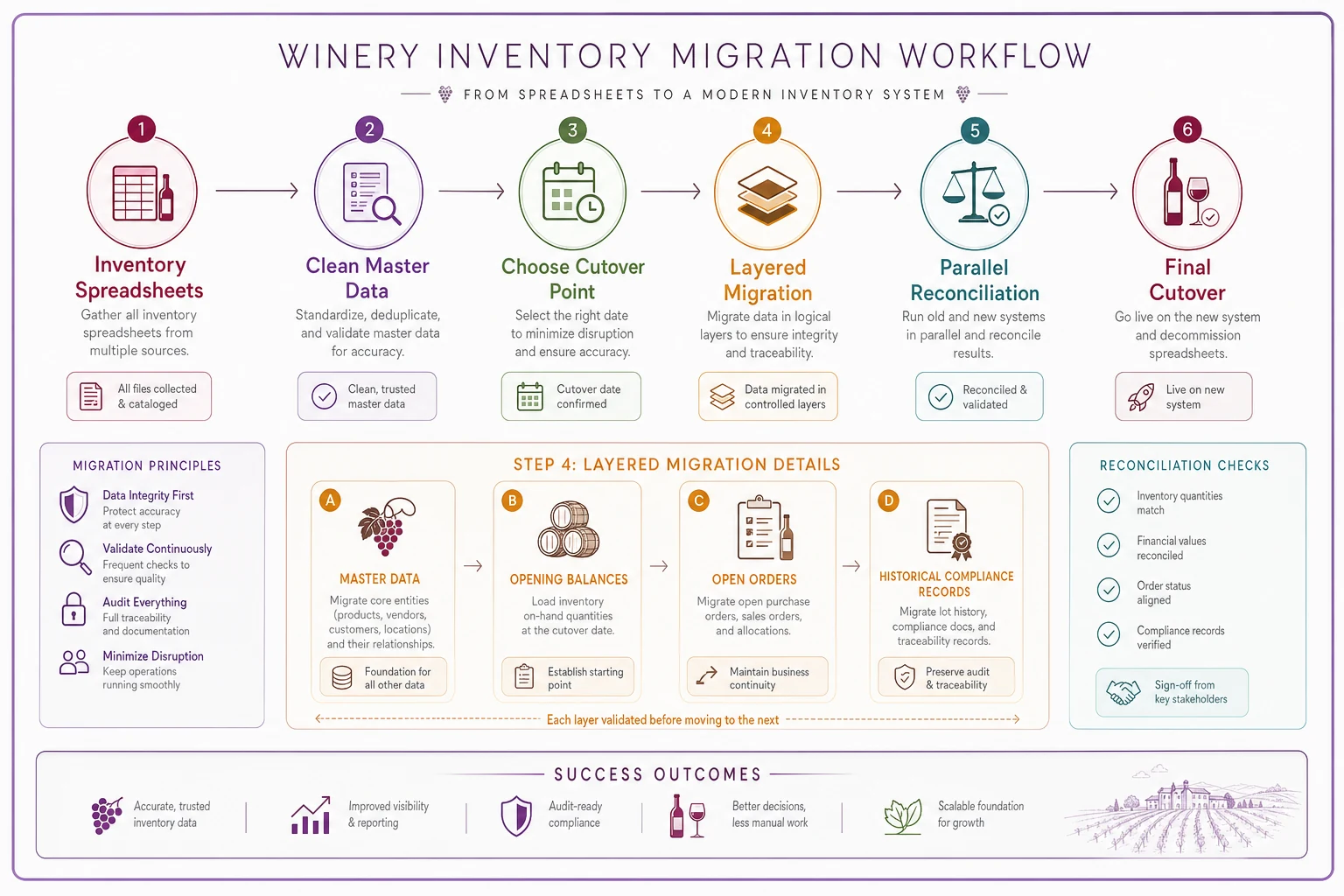
The migration is where most rollouts quietly go sideways. Your spreadsheets have years of institutional knowledge baked into inconsistent naming, color-coded cells, and conventions only your cellar master understands. Here's a migration map that respects that reality.
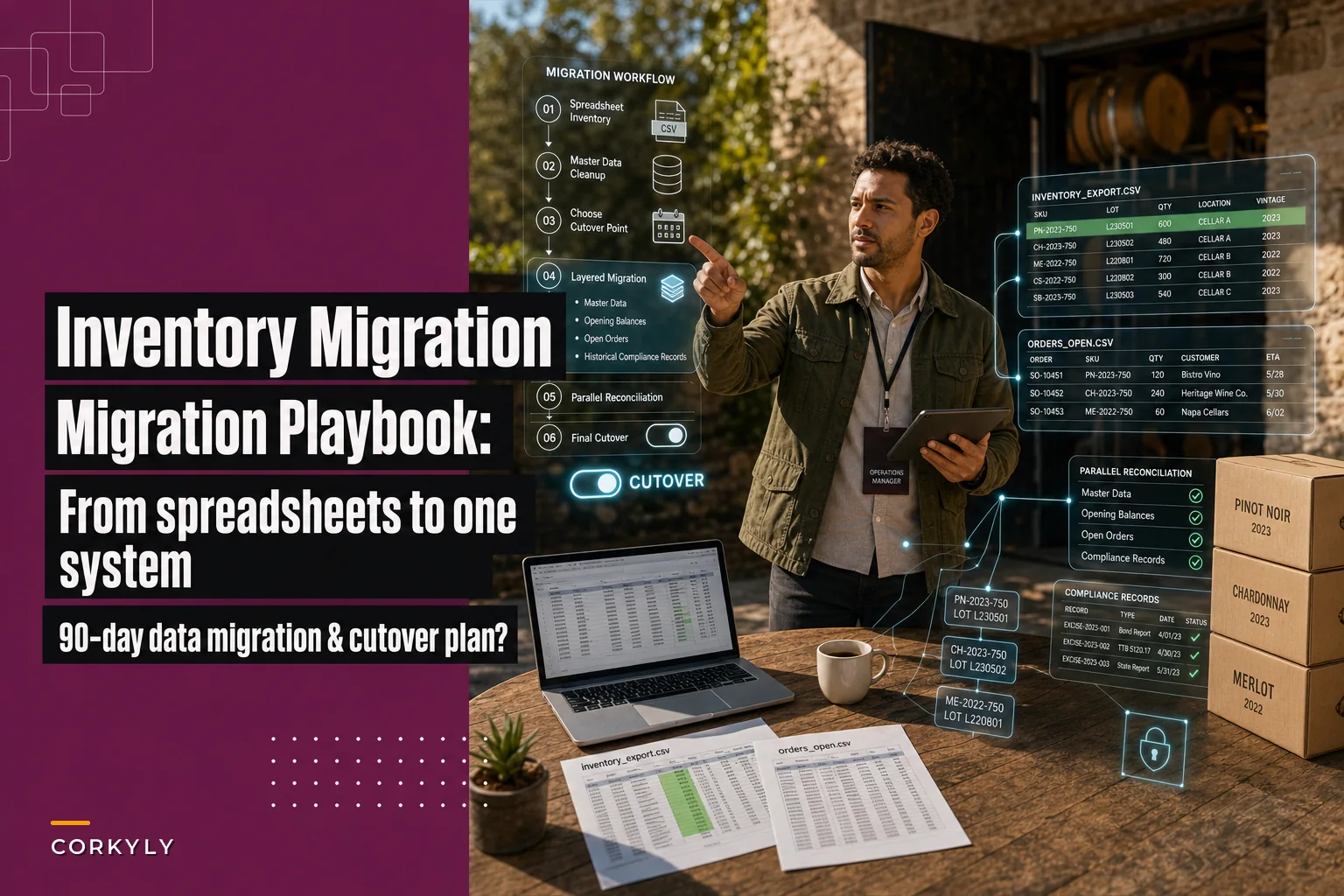
Step 1 — Inventory your spreadsheets. List every sheet that holds inventory truth: bulk wine log, barrel log, case goods, bottling records, compliance workpapers. Note who maintains each and how often.
Step 2 — Define your master data first. Before importing a single number, lock down your naming conventions for lots, blocks, products, and locations. If your records are messy here, clean it up before migration — not after. Inheriting spreadsheet chaos into a new system is one of the more avoidable ways to make this painful.
Step 3 — Pick a clean cutover point. The easiest moment to migrate is right after a physical count, ideally in your quieter season — never mid-harvest. You import verified opening balances, not a messy running total.
Step 4 — Migrate in layers.
-
Master data (products, locations, blocks, cooperage)
-
Opening balances (verified counts of bulk and cased goods)
-
Open orders and allocations
-
Historical records needed for compliance lookback
Step 5 — Reconcile before you trust it. Run the new system alongside your spreadsheets for a short window and compare. Discrepancies will surface. That's the point — find them while the spreadsheet is still your safety net.
Teams that try to import five years of transaction history usually regret it. You rarely need the full transaction log in the new system — you need accurate opening balances plus whatever lookback compliance requires. Keep the old spreadsheets archived and read-only for everything else.
A simple migration workflow helps keep everyone aligned.
Teams that try to import five years of transaction history usually regret it.
You rarely need the full transaction log in the new system — you need accurate opening balances plus whatever lookback compliance requires. Keep the old spreadsheets archived and read-only for everything else.
The 90-day phased rollout
Trying to flip the whole operation live at once is how you end up with a half-trained cellar crew entering nothing during crush. Phase it.
Days 1–30: Foundation
-
Finalize master data and naming conventions
-
Configure units, locations, user roles and permissions
-
Set up the first and most critical integration (usually accounting or POS)
-
Train a small core team — not everyone yet
-
Milestone master data loaded and verified, core team can navigate the system
Days 31–60: Parallel operation
-
Begin entering live cellar movements alongside spreadsheets
-
Load verified opening balances
-
Configure and test compliance reports against a known period
-
Train the full cellar and tasting-room teams on their specific workflows
-
Milestone a full TTB/state report generated from the system matches your manual version
Days 61–90: Cutover and hardening
-
Stop maintaining the parallel spreadsheets
-
Go live with remaining integrations (CRM, distributor orders)
-
Run your first real physical count / cycle count inside the system
-
Build the handful of reports owners and managers will actually check weekly
-
Milestone system is the single source of truth; spreadsheets archived
Two testing milestones matter more than anything else. First, the compliance report has to match a period you already filed — if it doesn't, you have a data or configuration problem, not a reporting quirk. Second, the cellar crew has to be able to record a topping, a blend, and a bottling run without calling anyone for help. If those two things work, you're in good shape.
When this makes sense — and when it doesn't
It makes sense when: you're reconciling the same numbers in multiple places, your TTB reporting is eating days, you're selling across DTC, club, and wholesale, or you've had a traceability scare and couldn't answer "which blocks are in this lot?" fast enough.
It's a bad idea right now when: you're in the middle of harvest, or you haven't cleaned up your naming and record structure yet. Migrating messy data into expensive software just gives you expensive messy data. Fix the foundation first.
Who should probably not rush this: very small producers — under roughly 1,500 cases, DTC-only — whose spreadsheet genuinely still works and who have no compliance pain. If it isn't costing you money or sleep, a premature system switch adds overhead you don't need. Revisit when a second channel or a bonded warehouse enters the picture.
A real scenario
An 18,000-case producer in a cool-climate region was running three spreadsheets that never fully agreed: cellar bulk, bottled goods, and an accounting workbook. Monthly TTB and state reporting took their ops manager close to three days of cross-checking, and they'd had two short-shipment chargebacks from a distributor in a single quarter because case counts were off.
They scoped the problem to transformation tracking and compliance — not DTC, which was actually working fine. That focus kept them from over-buying. After a clean post-count cutover during their slow season and a parallel-run period, reporting dropped from roughly three days to under half a day a month. The bigger win was quieter: when they needed to confirm which blocks fed a specific bottling lot for a wholesale account's traceability request, it took minutes instead of an afternoon of spreadsheet archaeology.
Nothing dramatic. No ten-times-ROI headline. Just a handful of recovered days every month and a traceability answer they could give with confidence — which, going into the next harvest, was worth more than the subscription cost.
Pulling it together
Picking wine inventory management software isn't really a software decision — it's an operational one. The winery that scores vendors against its actual bottlenecks, sends a real RFP, migrates on a clean cutover, and phases the rollout around harvest will get value out of almost any competent system. The winery that buys on a flashy demo and dumps messy spreadsheets into it mid-crush will struggle with even the best one.
Get your naming and record structure clean, protect your compliance reporting as the thing that must match, and treat the first harvest on the new system as the real test — because it is.
Downloadable resources: the full feature checklist and the sample RFP are available as editable templates so you can adapt them to your production volume and channel mix before you start calling vendors.
Related reading that pairs well with an inventory rollout: if your pain is partly on the supply side, the seasonal procurement calendar for preventing packaging delays and the sustainable packaging decision framework and supplier transition guide both tie directly into how you track cased goods. And since a system migration is a good moment to think about what you're protecting, the estate environmental risk governance guide for wildfire, frost and drought is worth a look.
Ready to elevate your winery management?
Join 500+ wineries using Corkyly to increase operational efficiency, boost customer loyalty, and grow sales.